AI TOOL / #07222
ReadImage
Extract, edit, and copy text from images on web pages.
Introduction
Extracts, edits, and copies text from images on web pages.
What is Image Text Extractor ai chrome extension/plugin?
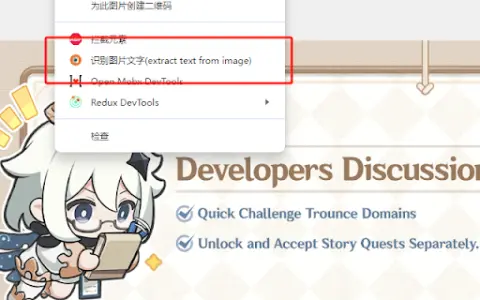
This extension allows users to extract text from images displayed on web pages. It supports common image formats such as jpg, jpeg, png and bmp. After extraction, the text can be edited and copied.
How to use Image Text Extractor ai chrome extension/plugin?
Hover your mouse over the image, right-click and select "Extract text from image". Press "Ctrl + Q" to view the extracted text on the extension page, where it can be edited and copied.
Image Text Extractor ai chrome extension/plugin core features
Extract text from images on web pages
Edit extracted text
Copy extracted text
Edit extracted text
Copy extracted text
Related
SummerEyes – AI Productivity Tool
AI-powered tools enable instant text summarization in browsers, allowing for rapid processing of information.
Blaze Feeds
An AI-powered RSS reader with smart summaries and cross-platform support.
ResearchBuddy.app
ResearchBuddy automatically generates literature reviews and briefs.
OneClick AI
OneClick AI simplifies workflows by allowing users to extract and summarize content with just one click.
PowerPost
PowerPost summarizes, translates and allows interaction with articles for quick insights.
rKnown2Notion
Notion integration for automatically syncing knowledge bases and content from Understanding Reading.