AI TOOL / #08846
Copy for Chat GPT
An extension used to copy ChatGPT responses and check for plagiarism.
Introduction
Extension to copy ChatGPT responses and check for plagiarism.
What is the Plagiarism Detector Extension for Chrome – an extension/plug-in for Google Chrome?
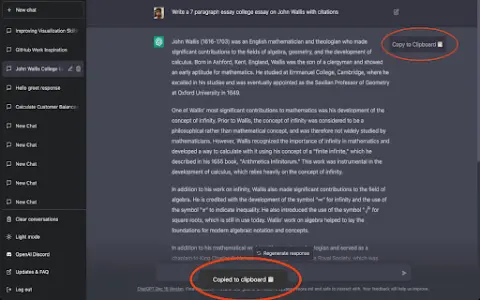
This extension allows you to copy the responses generated by ChatGPT by clicking a button or using the CMD+K shortcut key, and then have those responses checked by plagiarism detection tools.
How to use the Plagiarism Detector Extension for Chrome?
You can use this extension by clicking the copy button on ChatGPT’s response or by pressing CMD+K. The copied text will be automatically checked to determine whether it contains any plagiarized content.
The core functionality of the Plagiarism Detector Extension for Chrome.
One-click to copy the response from ChatGPT
Use the CMD+K shortcut key to copy.
Automatic plagiarism detection
Use the CMD+K shortcut key to copy.
Automatic plagiarism detection
Related
Agent One
No-code platform for building and hosting custom AI chatbots and agents.
GaliChat
Build, train, and share AI agents for use in customer support and lead generation.
Runner H
Runner H: AI agent for automating complex tasks and network automation.
unitQ GPT
An artificial intelligence-based platform designed to extract insights into product quality from user feedback.
HubbleIQ
An artificial intelligence-driven platform designed to identify and resolve technical issues encountered by end-users, thereby ensuring a reliable digital experience.
LIveX AI
LiveX AI provides AI agents to improve customer retention, support and reduce costs.