AI TOOL / #07462
Vision AI
A Chrome extension that enables AI-driven insights based on screenshot data.
Introduction
Chrome extension for AI-powered insights from screenshots.
What is a Vision AI Chrome extension/plug-in?
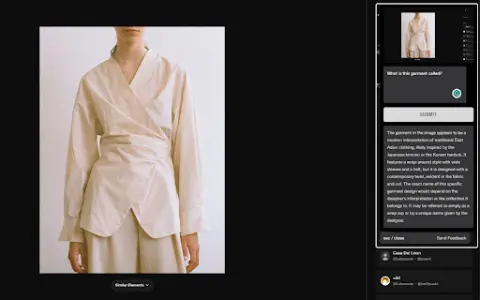
Visual AI is a Chrome extension that combines screenshot functionality with AI-driven insights to enhance online information search. It allows users to capture any portion of a web page, add notes or questions, and receive AI-generated responses based on the context of the captured image.
How to use the Vision AI Chrome extension/plug-in?
Install the Visual AI Chrome extension. Use CTRL + SHIFT + Y to take a screenshot, and then add any notes or questions you have. Visual AI will analyze the screenshot and provide an AI-generated response.
The core functions of the Vision AI Chrome extension/plugin
Screenshot capture
Interactive AI Suggestions
Seamless browser integration
Suitable for a wide range of applications in various fields
Privacy and Security
Interactive AI Suggestions
Seamless browser integration
Suitable for a wide range of applications in various fields
Privacy and Security
Related
QuizNest
A flashcard tool that utilizes machine learning technology to personalize and optimize learning sessions.
AI CARDS
Tools based on artificial intelligence, used for creating customized educational quizzes and study cards.
NoteKnight
An AI-based flashcard generator and learning tool, a competitor to Quizlet.
Studydrive
College Students' Learning Platform: learning materials, AI tools, communities, and career resources.
Learnrithm Ai
An artificial intelligence-based learning platform that offers personalized courses, quizzes, and multimedia resources.
CodeVideo
CodeVideo: Quickly create educational software content and export it in various formats.