AI TOOL / #07177
Chrome Virtual Camera
Use the clock, video file, and background masking options in place of getUserMedia().
Introduction
Replaces getUserMedia() with clock, video file, and background masking options.
What is the getUserMedia() Replacement AI Chrome extension/plug-in?
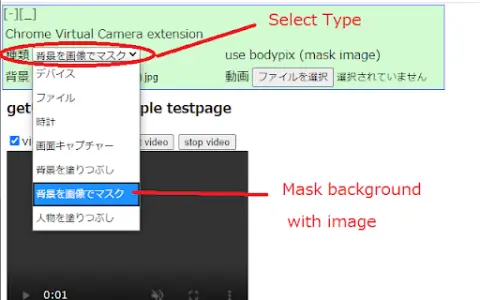
This tool replaces the standard getUserMedia() function, enabling the use of clocks, video files, as well as the tfjs/body-pix technology as background masks for video sources.
How to use the getUserMedia() Replacement AI Chrome extension/plug-in?
This tool intercepts calls to the getUserMedia() function and provides alternative video sources, such as clocks, video files, or video streams with masks using tfjs/body-pix. The specific implementation and configuration details depend on the particular library or technology being used.
The core functionality of the getUserMedia() replacement AI Chrome extension/plug-in
Replace the getUserMedia() function
Provide a clock as the video source.
Provide a video file as the source material for the video.
Implement background masking using tfjs/body-pix.
Related
Aftercare
An AI-driven investigation platform that features intelligent follow-up questions and automated data analysis capabilities.
Quaind
An AI-based automation platform for web testing quality assurance.
Kokoro
Browser extensions that offer AI-powered features to simplify online research.
isitsafe.io
isitsafe.io: A cryptocurrency review platform. Bear Market Busters: An NFT collection service.
omegle.site
A free random video chat website where you can talk anonymously with strangers.
GetBotAI
AI assistants for browsing, writing, summarizing, and creating content.