AI TOOL / #07148
ORC Text Snap
Tools used to extract text from images, videos, or PDF files using OCR technology.
Introduction
A tool to extract text from images, videos, or PDFs using OCR technology.
What is an Optical Character Recognition AI Chrome extension/plug-in?
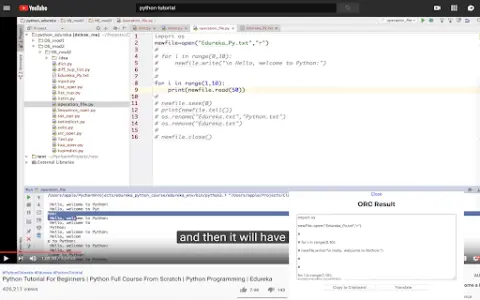
This is a practical tool that allows users to extract text from images, videos, or PDF files with just one click, eliminating the need to re-enter the text character by character. A common use case for this tool is copying any text contained in YouTube videos or tutorial materials in image format. This tool utilizes the lightweight OCR engine Tesseract.js to extract text from images.
How to use the Optical Character Recognition AI Chrome extension/plug-in?
1. Click the icon and then select the area or image that contains the text you want to extract.
2. Wait for the tool to complete the text extraction process.
3. The extracted text will be displayed in a text box. You can click the “Copy” button to copy it to the clipboard and then paste it anywhere using Ctrl + V.
4. You have the option to translate the extracted text into the language of your choice.
5. On the settings page, you can specify the OCR language as well as the target translation language.
The core functionality of the Optical Character Recognition AI Chrome extension/plug-in
Extract text from images, videos, and PDF files.
One-click text extraction
Copy the text to the clipboard.
translation options
OCR language selection
One-click text extraction
Copy the text to the clipboard.
translation options
OCR language selection
Related
Little Bunny Calligraphy Copybook
Tuxiaoguai Copybook is a free online children's copybook generator. Parents can generate copybooks online based on their child's age, and the tool supports direct printing on A4 paper. It covers Chinese character copybooks, pinyin copybooks, number copybooks, Chinese-style copybooks, and more, and also supports settings for font, font size, format, color, and more.
AI-generated paintings
"Dream Creation Diary" is a WeChat mini-program that uses AI technology for painting. With just a simple description, it can generate various styles of artwork for you! You can use it directly by scanning the QR code on WeChat. New users can create dozens of free paintings, and signing in every day will also grant you additional free generation opportunities. Just scan the QR code on WeChat to start using it for free.
CPU Performance Ranking Chart
The desktop CPU performance comparison chart, provided by Fast Technology, ranks the performances of both Intel and AMD CPUs in ascending order, allowing for a clear and intuitive comparison of their respective capabilities.
Law Master
Law Master is a free online legal consultation website. After taking a look, there is indeed no sign of any charges. If you have any legal issues, just ask directly and a professional will respond. Whether you encounter problems or have questions, you can go to the website for consultation: https://www.lvdashi
Viewing China with hundreds of billions of pixels
At 16:38:58 on October 12, 2024, this website became inaccessible. Our site only contains introductory articles. The “Viewing China in Billions of Pixels” website enables users to view panoramic images of cities magnified tens of thousands of times, allowing them to experience Chinese cities online, discover their unique features, and gain a better understanding of Chinese culture.
Marco Pineapple
Marco Pineapple — Marco Pineapple macbl is a website focused on Mac app downloads and a must-visit for Mac users. The site is clean and ad-free; no registration or login is required, and all Mac apps can be downloaded directly for free! Every app author provides a detailed introduction.