AI TOOL / #06688
Vocha | Voice for ChatGPT
Vocha is a voice input extension specifically designed for ChatGPT, with an emphasis on privacy and ease of use.
Introduction
Vocha is a voice-typing extension for ChatGPT with a focus on privacy and ease of use.
What is the Vocha AI Chrome extension/plug-in?
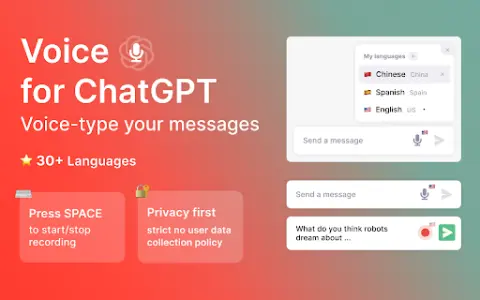
Vocha is a browser extension that allows users to input messages for ChatGPT via voice. It adds a microphone button to the message input field, which can be activated by using the SPACE key or by clicking on it. Vocha places great emphasis on user privacy, strictly adheres to policies that prohibit the collection of user data, and features a clean, minimalist design that ensures seamless integration with the ChatGPT interface.
How to use the Vocha AI Chrome extension/plug-in?
After installing the Vocha extension, a microphone button will appear in the ChatGPT message input box. You can press the SPACE shortcut key or click the microphone button to start and stop recording. You can change the language used for speech recognition by clicking on the flag icon. Remember to grant the microphone access permission during the installation process.
The core functions of the Vocha for Chrome extension/plugin
Provide voice input for messages sent via ChatGPT.
The SPACE shortcut key is used to start/stop recording.
Supports multiple languages (over 30 different languages).
Message editing options (send, edit, or continue recording)
Related
Nico
Voice AI assistant on Mac
WebGameHub
A website featuring 54 free HTML5 mini-games based on classic games – simply open the page and start playing. These games cover seven major categories, including puzzle, action, arcade, and card/racing games. There are no pop-up ads, and no registration is required for downloading them.
Valin
An AI that can use simple language to help users find and organize their collected content.
Dolphin Emulator
The most renowned open-source simulation project for the GameCube and Wii, compatible with multiple platforms including Windows, macOS, Linux, and Android. It is known for its high level of compatibility and improved graphics quality, supporting 1080p/4K resolution output. It is the ideal choice for experiencing classic games such as “The Legend of Zelda: A Link to the Past” and “Mario Kart Wii”.
RPCS3
The world’s first open-source PlayStation 3 emulator/debugger, compatible with Windows, Linux, macOS, and FreeBSD platforms. After years of development, it is now capable of running a large number of PS3-exclusive games.
DOSBox-X
An enhanced version of DOSBox, offering more accurate hardware simulation and a wider range of features. It supports a greater number of DOS applications and games, making it one of the best options for running old DOS programs.