AI TOOL / #06525
Whisper Text Reader
Browser plug-in that reads selected text aloud using text-to-speech technology.
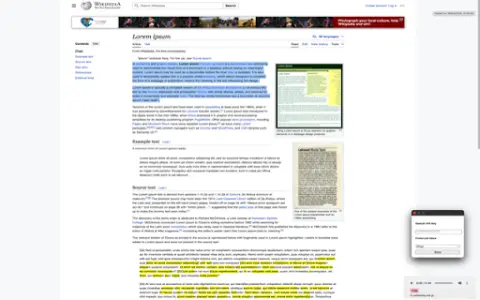
Introduction
Browser extension that reads aloud selected text using text-to-speech technology.
What is Read Aloud ai chrome extension/plugin?
Read Aloud is a browser plug-in that uses text-to-speech (TTS) technology to read web page text aloud. It supports multiple voices and languages, allowing users to customize their listening experience. The plug-in integrates seamlessly with web browsers, allowing users to easily select text and have it read aloud with a right-click.
How to use Read Aloud ai chrome extension/plugin?
Highlight selected text on a web page, right-click and select "Speak this text" to have the plug-in speak the selected text.
Read Aloud ai chrome extension/plugin core features
Text-to-speech functionality for web text
Related
VAIVR
VAIVR provides online shoppers with virtual try-on technology that uses 3D video.
Leiapix AI
Use AI to convert 2D images into 3D light field images and animations.
SUAPP AI
AI-powered design platform offering plugins and web applications for rendering, animation, and modeling.
Movmi: AI-Powered Motion Capture.
Free motion capture software, equipped with AI-powered tools and a 3D asset store.
Mureka
An AI-powered platform for music generation, editing, and copyright transactions.
Athena Photo Score Extension
Ensure high quality of patient photos in Athens records with automated quality checks and alerts.