AI TOOL / #06171
Patsa – AI-powered Meeting Copilot
A Chrome extension that enables real-time transcription and AI-powered Q&A during online meetings.
Introduction
Chrome extension for real-time transcription and AI-powered Q&A during online meetings.
What is the Patsa AI Chrome extension/plugin?
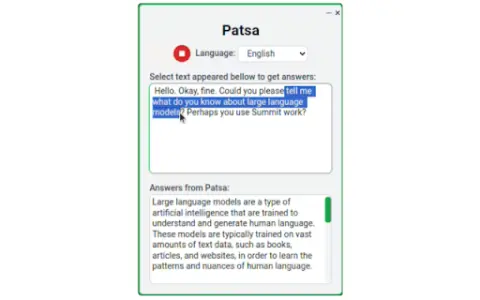
Patsa is a Chrome browser extension designed to enhance online meetings on platforms such as Google Meet, Zoom, and Teams. It transcribes other participants’ speech in real time and lets users select transcribed text to ask AI questions, providing instant information and answers.
How do I use the Patsa AI Chrome extension/plugin?
1) Launch the Patsa extension in any online meeting in Chrome. 2) Click the "Start Transcribing" button to transcribe what the other participants are saying. 3) Select the transcript text you want to ask the AI about, and you'll receive an instant response from the AI.
Core features of the Patsa AI Chrome extension/plugin
Real-time transcription of participants’ speech
AI Q&A based on transcribed text
Related
Quetext
Plagiarism detection tools and artificial intelligence-based content analyzers, which also include functionality for rewriting and citing sources.
GPT Detector by AE Studio
Identify text generated by GPT.
PuritySight
An AI-powered extension that blocks pornographic and erotic content to improve focus.
RideReply
Secure communication is enabled through vehicle license plates.
ConfuteGPT Extension
A Chrome extension designed to analyze articles, identify fake news, and provide reliability ratings.
No Porn
An AI-powered porn blocker with parental controls to ensure a safe online experience.