AI TOOL / #05993
ChatGPT – Lets talk
A Chrome extension that adds voice control and text-to-speech functionality to ChatGPT.
Introduction
Chrome extension adding voice control and text-to-speech to ChatGPT.
What is the ChatGPT – Lets talk AI Chrome extension/plug-in?
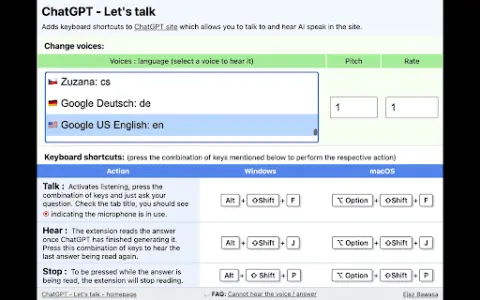
ChatGPT – Voice Interaction is a Chrome extension that adds voice capabilities to ChatGPT. It allows users to interact with ChatGPT using voice commands and enables the AI to read out its responses. This extension has been updated to include new features that allow users to change the AI’s voice, pitch, and speaking speed.
How to use the ChatGPT – Lets talk AI Chrome extension/plug-in?
To ask a question using the microphone, press Alt+Shift+F on Windows or Option+Shift+F on Mac.
2. Listen to ChatGPT repeating its last response, and then press Alt+Shift+J (on Windows) or Option+Shift+J (on Mac).
3. To stop reading aloud, press Alt+Shift+P on Windows or Option+Shift+P on Mac.
2. Listen to ChatGPT repeating its last response, and then press Alt+Shift+J (on Windows) or Option+Shift+J (on Mac).
3. To stop reading aloud, press Alt+Shift+P on Windows or Option+Shift+P on Mac.
The core functions of the ChatGPT – Lets talk AI Chrome extension.
Voice-input questions and ChatGPT
The text-to-speech function is used for the responses provided by ChatGPT.
Customizable voice options (over 100 different voices available)
Adjustable voice tone and speaking speed
Convenient keyboard shortcut controls
The text-to-speech function is used for the responses provided by ChatGPT.
Customizable voice options (over 100 different voices available)
Adjustable voice tone and speaking speed
Convenient keyboard shortcut controls
Related
Easy Anime Maker
AI anime generator and text-to-anime converter for easily creating anime art.
Pictura – AI Photo Enhancer
AI photo enhancer for Mac that...
BeautiAI
An AI platform that transforms photos into fantasy art and provides personalized style feedback.
AIlice
A lightweight artificial intelligence agent that utilizes open-source models to perform various tasks.
RunComfy
The Cloud-based ComfyUI platform enables AI-assisted artistic creation, boasting fast GPUs and a user-friendly workflow.
mappedin.com
Mappedin is an indoor mapping platform that offers AI tools for creating and sharing maps.