AI TOOL / #05433
OpenAI expenses checker
A Chrome extension that allows you to quickly check your OpenAI fees in your browser.
Introduction
Chrome extension for quickly checking OpenAI expenses directly in your browser.
What is the OpenAI Expenses Checker Chrome extension/plug-in?
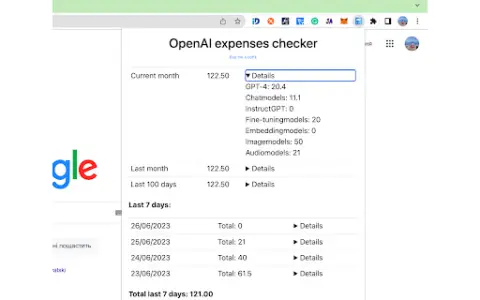
The “OpenAI Fee Checker” Chrome extension offers a faster and more convenient way to keep track of your OpenAI costs. With this extension, you can directly access the fee-tracking functionality within your browser, saving time and eliminating the need to visit a separate website. It features a user-friendly interface that seamlessly integrates with your browser, and provides real-time updates and notifications, making cost management much simpler and more efficient.
How to use the OpenAI Expenses Checker Chrome extension/plug-in?
Install the “OpenAI Fee Checker” Chrome extension from the Chrome Web Store. Once installed, you will be able to check your OpenAI fees directly within your browser, without having to visit a separate website.
The core functionality of the OpenAI Expenses Checker AI Chrome extension/plug-in
Directly track expenses within the Chrome browser.
A simplified interface that facilitates quick and easy access.
Real-time updates and notifications
A simplified interface that facilitates quick and easy access.
Real-time updates and notifications
Related
Interview Prep Now
An interview preparation and job search management platform, with AI assistance available.
Profile Crafter
An online service powered by artificial intelligence for generating perfect online profiles with photos and text.
Rapha
Rapha is an AI-powered ATS that streamlines early recruiting and assesses candidate fit through audio responses.
GAudio
This Chrome extension converts audio recordings directly into text format for use in emails.
TubeIQ
The AI platform that drives the growth of YouTube offers tools for analysis, video creation, and content development.
MuseChat
An AI companion platform designed for creating and interacting with AI characters.